Live Selling System
How to Stop Overselling in TikTok and Facebook Live Selling
To stop overselling in TikTok and Facebook live sales, take orders on a sale page instead of in the comments. A live selling system checks and deducts stock the moment each order is placed, and closes the item when it sells out. This guide shows sellers in Malaysia how to prevent overselling, even when a big crowd buys at once.
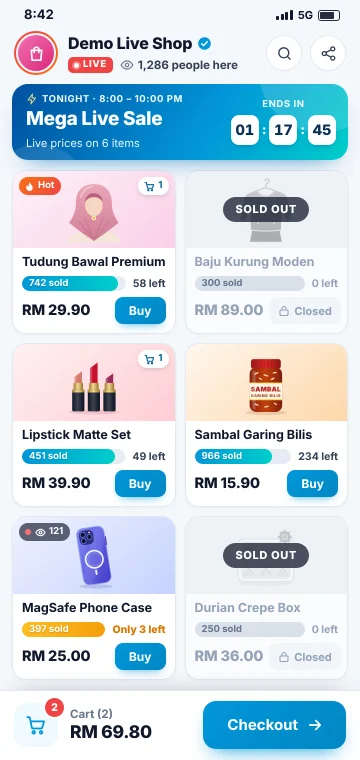
Whether you want a TikTok live selling system or a smoother setup for Facebook Live, the fix is the same.
Why does overselling happen during a live sale?
Overselling is usually not about carelessness. It happens when orders arrive faster than anyone can count them.
- Orders come in as comments. Buyers type a product code, and the comments scroll past in seconds.
- Many buyers order at the same moment. When you say "buy now", nobody can tell who was first for the last piece.
- Stock is counted by hand. An admin marks orders in a notebook or spreadsheet, often after the live.
- More than one person confirms orders. Two admins can promise the last piece to two buyers.
- The same stock sells in two places. If you go live on TikTok and Facebook, both crowds may claim the same items.
Every oversold order ends with an apology, a refund or a long wait for restock. Buyers lose trust, and your team spends time sorting it out.
How does a live selling system prevent overselling?
A live selling system moves ordering from the comments to a sale page. You share the link during your live, and buyers order on their phones.
Three things then do the work:
- Stock is checked and deducted for every order. It happens the moment the order is placed.
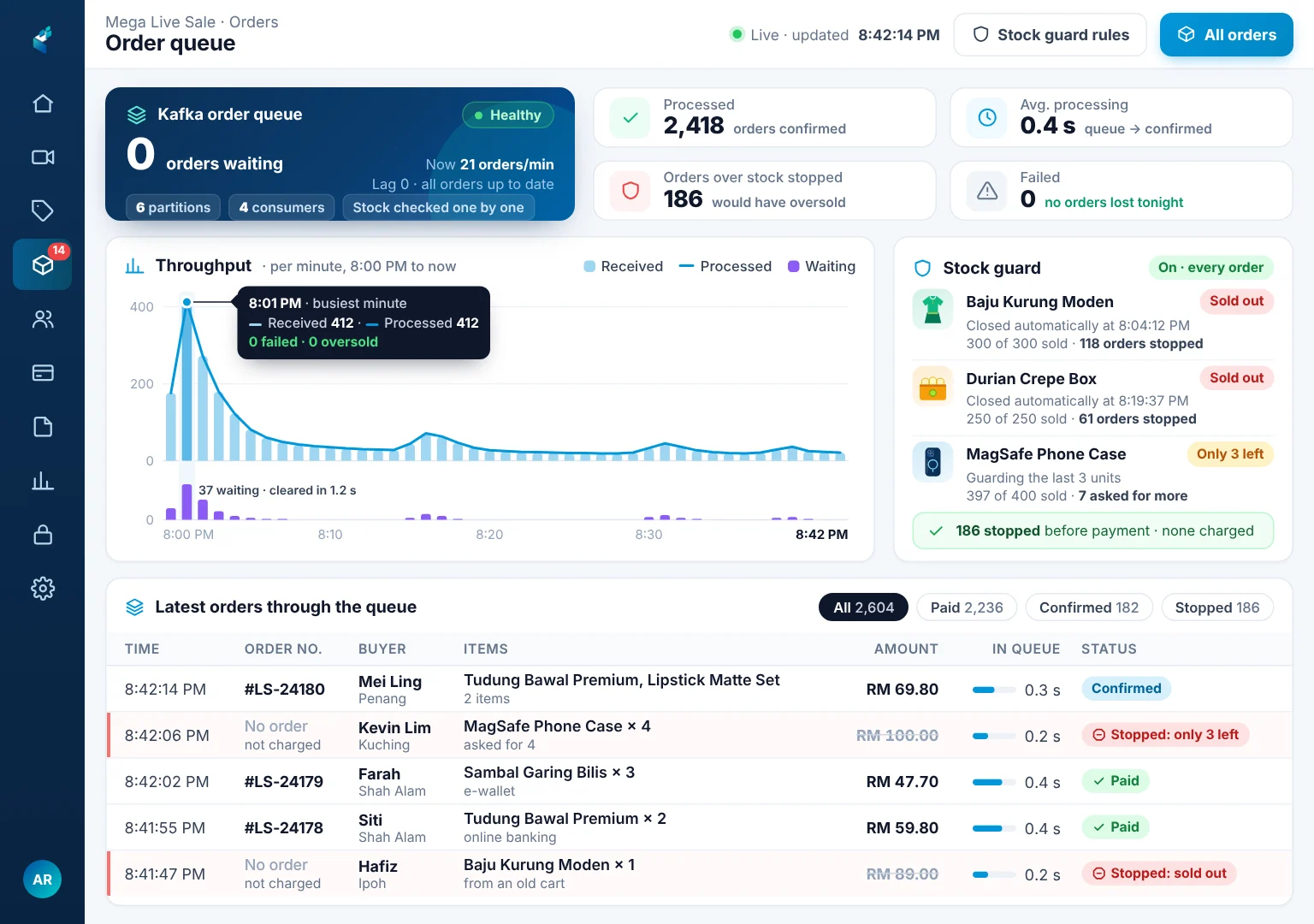
- An order queue keeps every order in line. When a big crowd orders at once, each order is processed in turn. The same piece never goes to two buyers.
- Items close automatically when sold out. Buyers see how many are left, and nobody can order stock you do not have.
| Orders in comments | Orders on a sale page | |
|---|---|---|
| Stock count | By hand, often after the live | Checked and deducted on every order |
| The last piece | Whoever the admin spots first | The first order in the queue |
| Sold out items | The host has to announce it | The item closes by itself |
| Payment | Chased one by one after the live | Paid at checkout |
What else should a live selling system in Malaysia do?
Stopping overselling is the main job. These features make each live easier to run and learn from.
- A selling date and time for each product. Add photos, price and stock before the live, then choose when each product goes on sale.
- Online payment at checkout. Buyers pay through a payment gateway, right after they order. The money goes straight into your own merchant account.
- Visitors by page. See how many people are on your shop, and which page each is on. It shows you the right moment to push a product.
- Approval for price changes during a live. In the rush, a wrong price is easy to key in. An approval step keeps prices in the owner's hands.
- Reports on best sellers and conversion. After each live, see what sold, how many visitors bought and your peak minutes. Use this to plan stock for the next live.
How to run your next live without overselling
- Count your real stock and enter it for each product before you go live.
- Set each product's selling date and time to match your live plan.
- Share your sale page link on the live, and repeat it often. Ask buyers to order there, not in the comments.
- Watch the visitor count, and talk about the products people are viewing.
- After the live, check your best sellers and conversion before you restock.
How Techub's Live Selling System works
Techub's Live Selling System is built for TikTok and Facebook live sellers in Malaysia. Stock is checked and deducted for every order the moment it is placed, whether buyers come from TikTok or Facebook Live. Sold out items close automatically.
Kafka order queueing processes a big rush of orders in turn, so your sale page stays fast. You choose each product's selling date and time.
Techub works with various payment gateways. Buyers pay at checkout by online banking (FPX), card or e-wallet, depending on your gateway. The money goes straight into your own merchant account.
The live dashboard shows your visitors and the page each is on. Price changes during a live can need your approval. Reports on best sellers and conversion are generated in under 100 ms.
It runs on servers in Malaysia with a 99.95% uptime guarantee. It starts from RM 199 a month per outlet, depending on your needs. See pricing for what is included.
Questions people ask
How do I stop overselling during a TikTok or Facebook live?
Take orders on a sale page that checks and deducts stock the moment each order is placed. Share the link during your live, and each item closes by itself when it sells out.
Can a live selling system handle many buyers ordering at the same time?
Yes, if it puts orders in a queue and processes each one in turn. Techub's Live Selling System uses Kafka order queueing, so the sale page stays fast and no item is sold twice.
How much is a live selling system in Malaysia?
Techub's Live Selling System starts from RM 199 a month per outlet, depending on your needs. You can request a demo on WhatsApp to see it working with your own products.
See it running in your business
Request a demo on WhatsApp to see how the Live Selling System fits your next live.
From RM 199/month per outlet